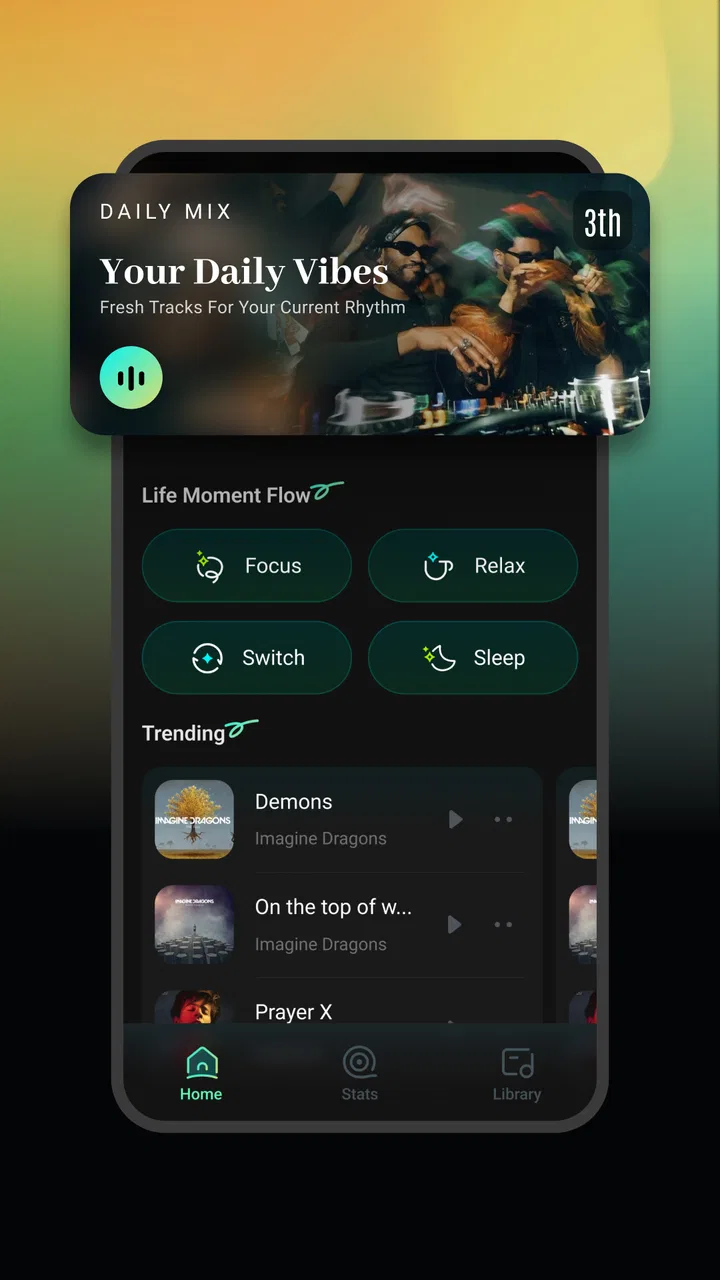
Sonivo:Music Player
- 4.6
- Rating
- 10.00K
- Installs
- Free
- Price

 Analysis by App-foxy
I tried Sonivo: Music Player as a straightforward way to keep music available on an Android device, especially in situations where a shared phone or tablet needs to serve more than one person. Its appeal is easy to understand: it is a free music and audio app from I Care, built around listening without depending on Wi-Fi. That makes it more interesting for a household than a typical streaming shortcut, because the device can remain useful during commutes, travel, weak-signal moments, or simply when nobody wants to spend mobile data.
My experience with it is best described as practical rather than luxurious. Sonivo does not present itself as a large streaming service with a social layer, elaborate recommendations, or a complicated account system. The focus is listening to music already available for offline use. That narrow purpose can be a strength when several people use the same device, but it also means the app is only as convenient as the music prepared on that device. If you want a service that constantly discovers new releases for you, a conventional streaming platform may still suit you better.
How Sonivo fits into a shared household device
The most convincing everyday scenario is a family tablet kept in a kitchen, living room, or car. One person can prepare music while connected, and another can later listen without needing to sign in, search through a streaming catalog, or rely on a stable connection. A child might use the device for familiar songs, while a parent uses it during cooking or a short drive. The value here is not advanced household management; it is the simple fact that one offline music player can remain ready for different listeners.
You May Also Like

 Pandora - Music & Podcasts
Pandora’s Music Is Easy to Start, but Harder to Recover
Pandora’s strength is its low-effort path from a seed to a station. Its weak spot is how much confidence it asks you to place in connection, setup, and quiet recovery.

 8 Ball Pool
 Is Built on Rivalries, Rematches, and Routine
A close look at the rivalries, rematches, shared routines, and unanswered safety questions that turn a quick pool match into a persistent mobile community.

 Samsung Music
’s Quiet Strength Is Playing What You Already Own
Its reach comes less from spectacle than from dependable access to a personal library. That simplicity is both the app’s strongest retention engine and its ceiling.

 AccuWeather: Weather Radar
AccuWeather Review: A Quick, Clear Forecast for Everyday Decisions
For everyday plans, the best forecast is the one you can understand quickly. AccuWeather makes rain timing, radar, and local conditions easy to act on, with a few trade-offs.

 Hill Climb Racing
Why Hill Climb Racing Still Turns Crashes Into One More Run
A tiny car, a bumpy hill and one more upgrade: Hill Climb Racing keeps resurfacing because its simple chaos makes every near-miss feel personal.

 AliExpress - Shopping App
AliExpress Makes Global Shopping Feel Personal, but Shoppers Bear the Risk
AliExpress turns a global marketplace into a pocket-sized discovery engine. Its reach is useful, its shopping loop compelling, and its trade-offs easy to miss.
More From Our News Desk
View All News


I would still treat the device as a shared listening space rather than a collection of separate personal libraries. Sonivo is not something I would choose when every household member needs private recommendations, individual history, or carefully separated preferences. Without inventing account boundaries that are not part of the experience, the sensible approach is to agree on what music belongs on the device and how it should be organized. That small conversation prevents the player from becoming cluttered or confusing.
For shared use, I found that preparation matters more than the first launch. A compact selection arranged by purpose is easier to hand over than a large, unstructured collection. I would create clear groups such as calm music, travel listening, family choices, and personal favorites if the device’s available file organization supports that workflow. The key insight is that offline listening shifts the work from playback time to preparation time. Once that is accepted, the app becomes much less frustrating.
Sonivo’s free price also changes the household calculation. There is no purchase decision standing between a spare device and basic offline playback, which makes it suitable for someone who wants to test a simple music setup before committing to a paid service. At the same time, free does not mean effortless: the listener still needs music that can be played locally, and the device still needs enough available storage for the chosen collection. I would check both before promising the app to a family member.
Preparing music without creating household confusion
My practical recommendation is to decide who maintains the collection. If everyone adds files whenever they want, finding a particular song can become harder, not easier. One person can act as the organizer, or the household can agree on a small routine for adding and removing music. This is especially useful on a tablet that children use, because a tidy collection reduces accidental changes and makes the listening experience feel predictable.
A second useful habit is to prepare for the moment when the device leaves the house. Before a trip, I would test a few songs with connectivity turned off rather than assuming that everything is ready. That quick check catches the most important offline-use problem: a collection may appear present but not behave as expected when the network is unavailable. It is a better test than discovering the issue halfway through a journey.
I also prefer keeping a deliberately limited travel selection instead of copying every available track. A smaller collection is easier for another person to browse and less likely to bury familiar choices. This is one of Sonivo’s less obvious trade-offs: its simplicity rewards curation. People who enjoy managing a personal library may appreciate that control, while people who expect a service to organize everything automatically may find the process too manual.
What setup means when several people use one device
The initial setup should be treated as a boundary-setting step. I would first decide whether the device is mainly for adults, children, guests, or everyone. Then I would prepare only the music appropriate for that shared purpose. Sonivo is rated for Everyone, which makes its general positioning approachable, but an age rating is not a substitute for a parent deciding what content belongs on a particular family device.
I would also avoid mixing personal listening habits into a communal library unless everyone is comfortable with that. A shared tablet can reveal more about a person’s taste than intended, and a child may open music that was added for an adult. The app itself should not be treated as a privacy boundary. The household boundary comes from the device arrangement, the selected files, and the people who can access it.
That distinction matters because Sonivo is not the same as a multi-profile streaming account. If your priority is keeping one listener’s library, history, and recommendations separate from another’s, a profile-based alternative is more appropriate. Sonivo makes more sense when the goal is a common offline player, not a set of private music identities.
On Android, the minimum operating-system requirement is version 8.0, so compatibility is reasonably friendly to older devices that may have been repurposed for household use. I would still check the actual device before planning a setup, particularly if it is an old tablet with limited storage or sluggish performance. The current version is 1.0.8, and as with any relatively focused player, the experience can depend on how well the device handles its own local music collection.
Coordinating listening without pretending there are family controls
Sonivo can support coordination, but only in a simple, human way. I would use a shared device as the agreed playback point and keep the music selection understandable to everyone. For a car ride, one person can prepare the offline material, another can choose from it, and the driver can avoid handling the device while moving. The app’s usefulness in that situation comes from reducing the need for a connection, not from managing people automatically.
This is also where I would set expectations with children. They can be given access to a prepared selection, but I would not assume that the player provides parental controls, separate child spaces, or approval workflows. Those features should not be inferred from the app’s simple offline purpose. If a household needs those protections, they should look for them in the operating system, the device’s existing supervision tools, or a different music service designed around individual accounts.
Another coordination tip is to agree on a stopping point before handing over the device. Shared playback can become awkward when one person changes the current song while another is listening. A small rule such as “finish the current playlist before replacing it” is surprisingly effective. It turns a basic player into a predictable household tool without pretending that Sonivo includes a formal queue-management system for families.
For guests, I would prepare a neutral collection rather than exposing the full personal library. This makes the app useful in a holiday rental, waiting room, or family gathering where several people may take turns with the same device. The trade-off is obvious: the more carefully the device is prepared, the more pleasant it becomes, but that preparation belongs to the user rather than being automated by the app.
Age, trust, and sensible access
The Everyone rating is reassuring for general availability, but I would interpret it carefully. It indicates that the app itself is positioned for a broad audience; it does not tell me that every song placed on the device is suitable for every listener. Parents should review the actual collection, particularly when a child uses a shared phone or tablet without direct supervision.
Trust also includes the physical device. If Sonivo is installed on a phone used by several people, I would consider whether each person should be able to modify the music library or only play what is already there. The app may be perfectly fine for listening, yet the surrounding device permissions and habits still determine whether the arrangement feels controlled. In a household, the safest workflow is usually to separate the person who curates music from the people who simply press play.
I like that the app does not require a complicated explanation to a younger listener. The basic idea is easy to communicate: choose music that has been prepared, then listen when the device is offline. That clarity is useful for older relatives as well. Someone who finds streaming catalogs overwhelming may prefer a smaller, familiar selection with fewer decisions.
However, I would not recommend Sonivo as the only music solution for a household where different ages need very different content and independent control. A streaming service with profiles, supervised accounts, or explicit content tools can offer stronger separation. Sonivo is better when trust is already established and the device’s collection is intentionally shared.
How it compares with streaming and other offline choices
Compared with a standard streaming app, Sonivo feels less expansive but more focused. Streaming wins when I want instant access to a huge catalog, personalized discovery, synchronized listening across devices, and an account that follows me from one device to another. Sonivo wins when I already know what I want to hear and want playback to continue without Wi-Fi. Neither approach is universally better; they solve different problems.
Compared with a more feature-heavy local music player, Sonivo’s appeal is its low barrier to entry. People who dislike complicated menus may appreciate a dedicated place for offline music. The cost of that simplicity is that experienced listeners may miss advanced library tools, deep sorting, equalizer controls, synchronization, or other refinements they have come to expect from specialized players. I would choose it for uncomplicated access, not for studio-like control over playback.
It also differs from downloading music temporarily inside a streaming service. With a subscription-based alternative, offline listening is usually tied to an account and the service’s rules. Sonivo’s household appeal is more direct: the device can act as a shared player for the music prepared on it. That can be easier for a family, but it also places responsibility on the user to manage the collection and keep it current.
One realistic decision test is this: if you frequently say, “I want to discover something new right now,” choose streaming. If you more often say, “I want these familiar songs to work during the trip,” Sonivo deserves consideration. That distinction helped me understand the app’s proper place. It is not trying to replace every music service; it is useful when reliability and simplicity matter more than catalog size.
Small frictions that affect the real experience
The biggest friction is the offline premise itself. The app can only be as useful as the music available for offline playback, so a first-time user may need to spend time preparing the device. Someone expecting a search box that instantly finds any artist may feel disappointed. I would explain this before recommending it to a friend, because the phrase “offline music” can mean different things to different people.
Shared use creates another limitation: a single collection can become a compromise. One listener’s relaxing playlist may be another listener’s unwanted background noise. Without separate profiles, the household has to solve that socially or by keeping several clearly separated collections. That is manageable for a small family, but less attractive for a group with very different tastes.
Storage and organization are practical concerns too. I would not fill an older device without checking how much space remains, and I would remove music that nobody uses rather than allowing the library to grow endlessly. This is an advanced but simple workflow: treat the device like a small, maintained jukebox. Regular cleanup makes offline playback faster to navigate and reduces arguments over what should stay.
There is also a difference between being free and being complete. Sonivo costs nothing, which is a meaningful advantage for a spare device, but users should not expect the broader ecosystem that often comes with paid music platforms. I found its value strongest when I judged it as a focused utility rather than as a full entertainment subscription.
Who should install it, and who should skip it
I would recommend Sonivo to someone who wants a free offline music player for an Android phone or tablet, particularly when the device is shared or regularly used away from dependable connectivity. It is a sensible match for familiar playlists, road trips, simple household listening, older relatives who prefer fewer choices, and children using a parent-prepared selection.
I would also consider it for a spare device that needs one clear purpose. Turning an unused Android tablet into a kitchen or travel music player can be more practical than installing a large collection of apps. The app’s broad Everyone rating and support for Android 8.0 make that kind of reuse approachable, provided the device itself is still comfortable to operate.
I would skip it if my main requirement were live catalog search, personalized recommendations, private profiles, synchronized libraries, or detailed parental account management. I would also hesitate if I did not already have a clear plan for obtaining and organizing music for offline use. In those cases, a conventional streaming service or a more advanced local player would probably save time.
The app has attracted an average rating of 4.6 from a little over a hundred ratings, with more than thirty written reviews and over ten thousand installs. Those figures suggest that its straightforward idea is connecting with a modest but real audience, although I would still base the decision on the intended workflow rather than popularity alone. A simple tool can be a great fit for one household and a poor fit for another.
My household verdict
After using Sonivo, I see it as a deliberately narrow music tool that becomes more useful when the listening environment is shared. Its strongest quality is not a flashy feature; it is the ability to keep a prepared collection available without making every listener manage a streaming account. For a family tablet, travel phone, or uncomplicated offline setup, that can remove a surprising amount of daily friction.
My advice is to install it with a plan: choose the device, decide who curates the music, prepare a manageable collection, test playback without connectivity, and agree on how people will share it. Those steps address the app’s real limitations before they become problems. They also make the experience more welcoming for children and older relatives without claiming that Sonivo provides family controls it does not promise.
Sonivo: Music Player is free, approachable, and best when the goal is dependable listening from a shared offline collection. I would recommend it to friends who value simplicity over discovery and who are comfortable maintaining their own music library. I would point others toward a profile-based streaming service if privacy between listeners, new music, or account-level control matters more. In the right household, though, this small focus is exactly what makes it useful.
FAQs for Sonivo:Music Player
01What is Sonivo: Music Player, and what can I use it for?
Sonivo: Music Player is designed for listening to music stored on your device in a convenient, organized interface. It typically lets you browse songs, albums, artists, and playlists, while offering standard playback controls such as shuffle, repeat, queue management, and background playback. It is best suited to users who want a local music player rather than a service focused primarily on online streaming or social discovery.
02Does Sonivo: Music Player require an internet connection or a subscription?
For playing music already saved on your phone, Sonivo generally works without a continuous internet connection, which is useful when traveling or trying to reduce mobile data usage. Whether the app includes advertising, optional premium features, or subscription-based tools can depend on the version and platform. Before downloading, check the current store listing for pricing, in-app purchases, and any limitations applied to free users.
03Which audio files and devices are supported by Sonivo: Music Player?
Support can vary according to the operating system and the specific release, but a local music player normally recognizes common formats such as MP3, AAC, WAV, and FLAC when those files are accessible to the device. Sonivo may also work with headphones, car audio systems, and Bluetooth speakers through the phone’s standard audio controls. Compatibility should be confirmed on your device before transferring a large library.
04Can I create playlists and customize the listening experience in Sonivo?
Sonivo is intended to make personal music libraries easier to manage, so playlist creation, favorites, queues, and sorting options are among the features users commonly look for. Depending on the release, you may also find an equalizer, themes, playback timers, or lock-screen controls. Some tools can require additional permissions or may differ between Android and iOS, so explore the settings after installation.
05What permissions does Sonivo: Music Player request, and is it safe to install?
A music player normally needs permission to access audio files or media stored on your device so it can scan and play your library. It may also request notification or Bluetooth-related access for background playback and wireless controls. Review the permissions shown in the official Google Play or App Store listing, install only the legitimate publisher version, and avoid granting unrelated permissions that are not necessary for music playback.
Pros
- Clean interface makes browsing albums and playlists straightforward.
- Supports background playback while using other apps.
- Customizable playback controls improve everyday listening.
- Quick search helps find songs
- artists
- and albums easily.
- Offers useful sorting options for organizing a personal music library.
Cons
- Some advanced features may require a paid upgrade.
- Compatibility with unusual audio formats can be limited.
- Large libraries may take time to scan and organize.
- Audio enhancements can use extra battery during extended playback.
- No built-in music catalog if you do not already have local files.

Sonivo:Music Player
Gallery